Cybersecurity / Network Engineering
Wasabi Homelab
A personal infrastructure lab for designing, deploying, breaking, and rebuilding real networking and compute — OPNsense, Linux, DNS, self-hosting, and systems troubleshooting.
Built from physical hardware and self-hosted services — an iterative lab where failures are the debugging curriculum, not something handed off to a managed provider.
Wasabi Homelab is my personal infrastructure laboratory: a continuously evolving environment where I design, deploy, break, troubleshoot, and rebuild real networking and compute infrastructure.
Rather than using a managed platform for everything, I deliberately built the environment from physical hardware and self-hosted services. The lab gives me a place to work directly with routing, firewalling, DNS, Linux administration, remote access, Git infrastructure, server hardware, and system-level troubleshooting.
The project is intentionally iterative. I treat the environment less like a permanently finished home server and more like a small infrastructure platform where the architecture can change as I learn new technologies or run into limitations.
The current documentation is being maintained in a dedicated wasabi-homelab repository intended to contain infrastructure documentation and configuration rather than application source code.
Infrastructure philosophy
The primary reason for building the lab was to move networking and systems administration from abstract concepts into something I could actually operate.
Instead of simply learning what DHCP, DNS, routing, firewalls, SSH, Linux permissions, or network segmentation are, I wanted to be responsible for the complete system that provides those services.
That means when something breaks, there is no managed appliance or cloud provider to hide behind.
The failure becomes the debugging problem.
This has pushed me toward a systems-engineering mindset where I think about infrastructure as a collection of interacting layers:
- Physical hardware
- Operating system
- Network interfaces
- Routing and firewall
- DNS
- Services
- Applications
A configuration change at one layer can propagate through the entire stack, so diagnosing issues requires understanding how those layers interact rather than treating individual services in isolation.
OPNsense network infrastructure
One of the main components of the lab is an OPNsense-based routing and firewall platform.
Rather than leaving the network architecture entirely to the ISP-provided router, I have been using OPNsense as the controllable network edge where I can experiment with routing, DHCP, DNS, firewall policy, and traffic management.
This gives me direct control over the network layer and allows the lab to operate more like a small production environment.
The firewall becomes the boundary between the WAN and the internal network, while internal services can be configured behind it with explicitly controlled addressing and forwarding rules.
This has given me practical experience with:
- IPv4 addressing
- DHCP
- DNS
- NAT
- routing
- firewall rules
- network interfaces
- service listeners
- port allocation
- network troubleshooting
- LAN/WAN separation
- daemon management
- CLI-based diagnostics
DHCP and DNS
The network infrastructure currently uses dnsmasq as part of the OPNsense service stack.
During troubleshooting I inspected the actual listening sockets from the OPNsense shell rather than relying only on the web interface.
For example, sockstat showed the dnsmasq process listening for DHCP traffic on UDP/67 and exposing DNS-related listeners on port 53053. This was useful for validating that the expected network services were actually bound at the operating-system level rather than merely appearing enabled in the configuration interface.
This type of verification became part of the way I troubleshoot the environment:
- Configuration
- Process
- Socket
- Network traffic
instead of assuming that a GUI toggle necessarily means the service is behaving correctly.
DNS resolver experimentation
I have also investigated DNS-over-HTTPS / DNS-over-TLS-style resolver infrastructure and filtering resolvers, including resolver catalogs containing providers such as Cloudflare, CIRA Canadian Shield, and Control D.
This led to experimentation around how DNS resolution can be delegated to upstream providers while retaining local control over the resolver layer.
The interesting part is that DNS becomes another infrastructure component rather than something invisible supplied by the ISP.
Conceptually, the stack becomes:
- Client
- Local DNS service
- Filtering or encrypted resolver
- Authoritative infrastructure
This creates opportunities to experiment with resolver policy, filtering, upstream selection, privacy characteristics, IPv4/IPv6 behavior, and failure handling.
Linux server infrastructure
A significant portion of the lab is built around Linux.
I have been working directly from the shell for administration rather than relying exclusively on graphical management tools. That has included filesystem operations, process inspection, networking diagnostics, configuration management, package management, service administration, permissions, and remote access.
The lab has therefore become a practical environment for Linux systems administration.
Rather than memorizing commands independently, I have been using the command line as the primary interface for diagnosing actual infrastructure problems.
That has included examining:
- process tables
- network sockets
- interfaces
- routing
- DNS services
- system configuration
- service state
- logs
- remote connections
- filesystem state
This is particularly useful because Linux infrastructure rarely exposes every useful diagnostic through a GUI.
SSH and remote administration
SSH has become an important part of the infrastructure because the servers and network appliances do not need to be operated locally.
I have used SSH to administer machines remotely, inspect system state, modify configuration, and troubleshoot services directly from another computer.
This has also introduced me to the operational considerations around remote administration:
- key-based authentication
- host identity
- ports
- firewalls
- service availability
- remote shells
- privilege escalation
- network reachability
The result is an infrastructure environment where physical access is not required for routine administration.
Legacy hardware as a server
An interesting part of the lab is that I have intentionally used older hardware rather than restricting the environment to modern server equipment.
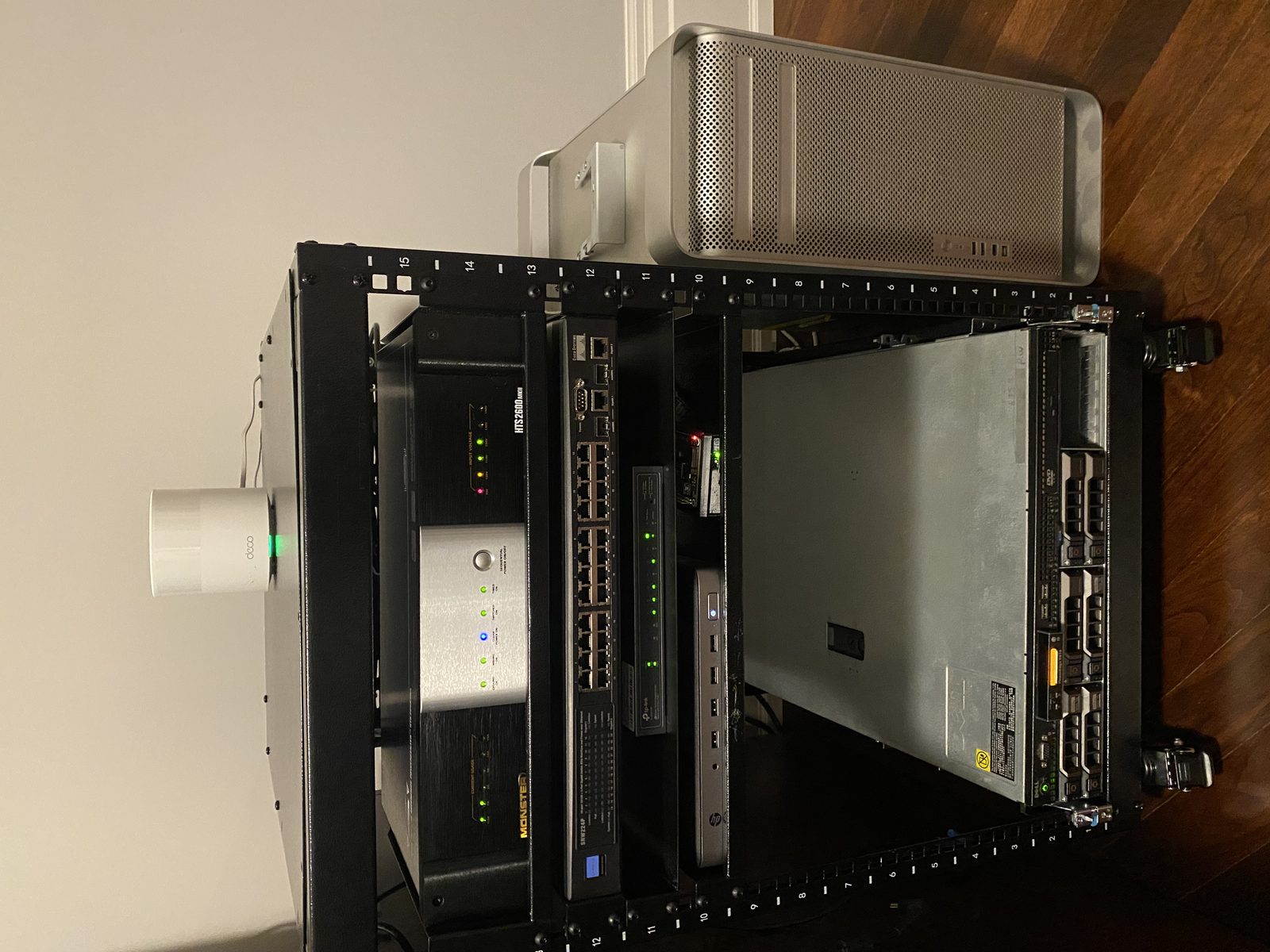
One example is a Mac Pro 1,1, which I worked through the process of getting Linux running on despite the machine’s legacy EFI constraints.
The Mac Pro 1,1 uses an older 32-bit EFI implementation despite being capable of running a 64-bit operating system, which makes modern Linux installation considerably less straightforward than on conventional PC hardware. This required working through the bootloader and EFI compatibility problem instead of simply writing an ISO to a USB drive and booting normally.
I ultimately worked through the Linux installation and boot process and used the machine as part of the lab.
This was valuable because it required troubleshooting at a much lower level than ordinary desktop administration.
Instead of a simple download-and-install path, the process became:
- Legacy firmware constraints
- EFI compatibility
- Bootloader configuration
- Kernel boot parameters
- Graphics initialization
- Linux installation
- Driver and service configuration
That was a very different class of systems problem.
Graphics and driver troubleshooting
Getting Linux running on the older hardware also required working through graphics initialization and display-driver behavior.
I investigated Xorg output and Radeon-related driver initialization while diagnosing the graphical environment.
This involved reading system logs to determine which driver stack was being loaded, which display outputs were recognized, and whether the graphics subsystem was actually initializing correctly.
That taught me to treat graphical problems as another systems layer rather than simply changing desktop settings until something worked.
The debugging path became:
- Hardware
- Kernel
- DRM
- Radeon driver
- Xorg
- Display manager
- Desktop environment
That kind of layered diagnosis is now applicable well beyond the specific machine.
Gitea
I also deployed a self-hosted Gitea instance as part of the lab’s development infrastructure.
The intent is to make source control itself another service under my control rather than relying exclusively on external Git hosting.
The current Gitea installation is configured around:
- Gitea
- Git repositories
- SQLite backend
- Local filesystem storage
- SSH access
The installation documentation shows Gitea using SQLite3 with the repository root under /data/git/repositories, running as the git user.
This turns the homelab into more than a network experiment; it becomes part of my development workflow.
I can use the infrastructure for source control, experimentation, configuration management, and documentation.
Infrastructure-as-code mindset
One of the directions I am taking with Wasabi Homelab is treating configuration as something that should be documented and eventually version-controlled.
The wasabi-homelab repository was created specifically to hold infrastructure documentation and configuration.
This is important because infrastructure that only exists inside an administrator’s memory is extremely difficult to reproduce.
By recording configuration, network architecture, service dependencies, hardware roles, and troubleshooting procedures, the environment becomes something I can rebuild rather than simply something I happen to have working.
That naturally leads toward infrastructure-as-code practices, configuration versioning, reproducible deployment, and eventually automated provisioning.
Network troubleshooting
A large portion of the actual learning has come from things going wrong.
The lab has given me a controlled environment where I can deliberately investigate problems such as:
- A service is enabled but not listening.
- A machine has an IP address but cannot reach another subnet.
- DNS resolution works locally but fails for clients.
- A firewall rule appears correct but traffic still does not pass.
- A daemon is running but is bound only to an unexpected interface.
- A graphical environment loads but the display hardware is not initialized correctly.
- An old machine boots one Linux image but fails on another because of firmware compatibility.
These are much more useful problems to encounter than purely theoretical exercises because each one requires tracing the failure through the system.
Documentation
Documentation is becoming a first-class component of the lab.
The wasabi-homelab repository is intended to hold infrastructure documentation and configuration, rather than simply acting as a dump of miscellaneous files.
I want the lab to eventually document:
- network topology
- IP allocation
- hardware inventory
- service architecture
- firewall policy
- DNS configuration
- server roles
- installation procedures
- configuration files
- troubleshooting procedures
- known issues
- future infrastructure changes
This effectively turns the homelab into a miniature engineering project with an accompanying technical specification.
Iterative development
Wasabi Homelab is not intended to be a finished system.
The architecture is evolving as I add hardware, learn new services, encounter constraints, and identify areas worth improving.
That means the lab follows a continuous cycle:
- Design
- Deploy
- Observe
- Troubleshoot
- Document
- Redesign
The system is intentionally allowed to fail in controlled ways because the failure itself provides information.
This is one of the reasons I consider the homelab an engineering project rather than simply owning a home server.
Systems I am building experience with
Across the lab I am deliberately building hands-on experience with networking fundamentals, OPNsense, encrypted and filtered DNS, Linux administration, SSH and remote systems management, process and socket inspection, service management, Xorg and the Linux graphics stack, Radeon drivers, legacy EFI and bootloaders, server hardware, self-hosting, Gitea, Git, SQLite, filesystem administration, configuration management, infrastructure documentation, systems troubleshooting, network diagnostics, and hardware/software integration.
What I am learning from Wasabi Homelab
The biggest thing the lab has taught me is that infrastructure is not made up of isolated technologies.
A firewall is connected to routing. Routing is connected to addressing. Addressing is connected to DHCP. DHCP and DNS affect how clients discover services. Services depend on operating-system processes. Processes depend on ports and sockets. Applications depend on those services being reachable.
A failure anywhere in that chain can present itself somewhere completely different from its actual cause.
That has pushed me toward thinking in terms of systems, dependencies, state, and observability rather than individual applications.
The homelab has essentially become my personal systems-engineering sandbox: a place where I can experiment with production-style infrastructure without needing to worry about breaking a commercial environment.