Software
Unity Robotics Survival Game — ProBuilder Demo
A first-person Unity survival experiment: custom CAD-built environments, articulated robotic-arm pursuers, and escalating horde gameplay.
A personal experiment blending competitive-FPS spatial design with robotic manipulator pursuit — Fusion 360 geometry imported into Unity, with continuous player tracking and escalating arm spawns.
This project was a personal experiment in combining game development, 3D level design, procedural enemy behavior, robotics, and mechanical modeling inside Unity. The idea was to build a small first-person environment inspired by the spatial layout and visual language of competitive shooters such as Call of Duty and Counter-Strike 2, then turn that environment into a survival scenario where the player is continuously pursued by robotic manipulators.
The project was built around a simple gameplay loop: the player navigates a custom environment while armed with a weapon, and robotic enemies track the player’s position and pursue them continuously. As the encounter progresses, additional robotic arms are spawned, gradually turning the scenario into a robotic horde-survival environment rather than a conventional one-enemy encounter.
Gameplay sneak peek
Short capture of the survival loop — replay anytime with the video controls.
Environment and level design
A significant part of the project was creating the environment itself.
Rather than relying on a pre-existing Unity scene or downloaded FPS map, I designed the playable environment around the spatial characteristics of competitive shooter maps: interconnected areas, traversal routes, sightlines, enclosed spaces, open sections, and locations where an enemy could approach the player from different directions.
The objective was to make the environment function as an actual gameplay space rather than simply serving as a visual backdrop.
The level needed to support:
- player traversal
- enemy pathing
- line-of-sight interactions
- enemy spawning
- combat
- spatial separation
- multiple approach vectors
That meant the geometry itself became part of the gameplay architecture.
Fusion 360 to Unity workflow
One of the more distinctive aspects of the project was the way I created the game’s physical assets.
I designed most of the environment and objects in Autodesk Fusion 360, treating the game’s world almost like a mechanical CAD assembly before importing the resulting geometry into Unity.
This included designing custom structural elements, environment components, and objects that needed specific dimensions or shapes.
Some simpler objects were instead constructed directly inside Unity, but the majority of the custom geometry originated in Fusion 360.
That created a workflow of:
- CAD modeling
- Geometry export
- Unity import
- Material setup
- Collision configuration
- Scene integration
This gave me experience translating engineering-oriented CAD geometry into a real-time 3D rendering environment.
3D asset construction
The assets were developed with consideration for both appearance and runtime behavior.
Geometry needed to remain visually convincing while also functioning correctly within Unity’s physics and collision systems. This meant thinking about polygonal geometry, collision boundaries, object pivots, transforms, scale, and how individual meshes would behave once placed into the scene.
The environment therefore had two representations: visual geometry and physical/gameplay geometry.
Those two representations do not always need to be identical, and understanding that distinction became important when configuring a playable scene.
Robotic enemy system
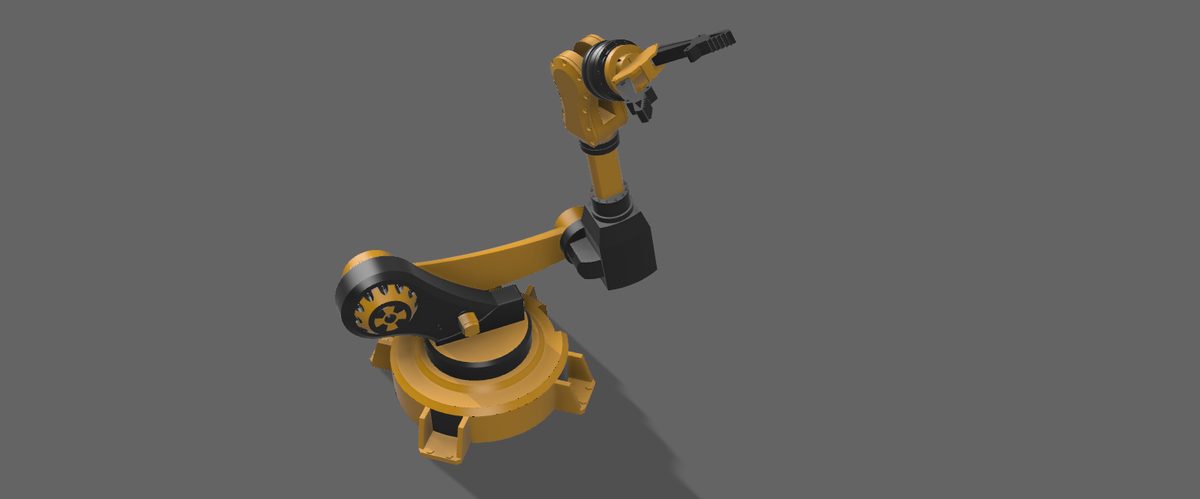
The primary enemy in the game was a robotic arm.
Rather than creating a conventional humanoid enemy, I used a mechanical manipulator as the pursuit system.
The robot continuously tracks the player’s position and attempts to follow them through the environment, creating a very different threat profile from a conventional AI character.
The arm essentially acts as a dynamically controlled mechanical agent whose behavior is driven by the player’s position.
This required coordinating:
- robot transforms
- target acquisition
- positional tracking
- pursuit behavior
- animation
- spawning
- collision
- player interaction
The resulting system treated the robot as an active mechanical object rather than simply an animated NPC.
Robotic arm model
3D model loads when scrolled into view…
Interactive OBJ of the robotic arm that chased the player — drag to turn it, scroll to zoom.
Target tracking
The core enemy behavior is based around continuously tracking the player.
The player’s position serves as the moving target for the robotic system, requiring the enemy to repeatedly update its behavior as the player moves through the environment.
Conceptually:
- Player transform
- Target position
- Enemy tracking logic
- Robotic movement
This created a persistent pursuit mechanic.
Unlike a scripted encounter where an enemy follows a predetermined route, the robotic arm’s behavior is reactive to the player’s actual position.
That made the environment and AI behavior tightly coupled: the usefulness of the map depended partly on how effectively the robot could navigate and maintain pursuit within it.
Robotic motion
The mechanical nature of the enemy required thinking about movement differently from a typical character controller.
A robotic arm is composed of articulated components rather than a single humanoid transform.
Its motion therefore naturally maps to concepts such as:
- joint hierarchies
- local transforms
- rotational constraints
- articulated segments
- end-effector positioning
- mechanical limits
Even though the project was a game rather than a robotics simulator, constructing the robot as an articulated mechanism required thinking about how the individual sections of the manipulator relate to one another.
The arm could therefore be treated as a hierarchical mechanical system:
- Base
- First joint
- First link
- Second joint
- Second link
- End effector
That relationship made the robot feel mechanically plausible while also providing the visual identity of the enemy.
Player weapon system
The player was equipped with a firearm, creating a conventional FPS interaction layer around the otherwise unusual robotic enemy.
This established the combat loop:
- Player movement
- Robotic pursuit
- Target acquisition
- Engagement
- Elimination
- Additional threats
The weapon gave the player a direct mechanism for interacting with the enemy rather than turning the project into a pure avoidance game.
That also meant the level needed to be designed around movement and engagement distances rather than simply allowing the player to stand in one location.
Enemy spawning
A major gameplay component was the ability for the system to spawn additional robotic arms.
Rather than having one enemy permanently occupy the map, new instances could be introduced over time.
This transformed the encounter into an escalating wave / horde-style system.
The fundamental progression becomes:
- One robotic pursuer
- Multiple pursuers
- Increasing spatial pressure
- Survival
The mechanic changes the role of the environment as the number of active enemies increases.
The player is no longer simply trying to reach a destination; they are managing an increasingly constrained playable space while multiple autonomous threats attempt to locate them.
Horde-style escalation
The spawning system also introduced a rudimentary difficulty curve.
As additional robotic enemies enter the environment, the number of simultaneous tracking agents increases.
That creates emergent difficulty without requiring the robots themselves to become fundamentally more intelligent.
In other words:
- difficulty = increasing agent count + persistent pursuit + constrained environment
This is an interesting game-design mechanism because complexity emerges from the interaction between relatively simple systems.
A single robotic arm may be manageable.
Several independently tracking arms create a substantially different problem.
Artificial intelligence and game logic
The project required implementing game logic that continuously responded to the player’s state.
The enemies needed to:
- identify the player
- acquire the player’s position
- update their target
- move accordingly
- remain active as the player navigates
- participate in the spawning system
That introduced practical experience with real-time state updates and reactive gameplay systems.
Rather than executing a static sequence, the game continuously evaluates the state of the world and updates the behavior of the robotic agents.
Scene architecture
The Unity scene effectively became a collection of interconnected subsystems:
- Environment — level geometry, colliders, navigation space
- Player — movement, camera, weapon, health / interaction
- Robotic enemies — target tracking, articulated movement, collision, spawning
- Game manager / gameplay state — enemy lifecycle, escalation, scene state
These systems needed to coexist inside Unity’s frame-driven runtime while maintaining consistent spatial relationships.
Physics and collision
The custom geometry also needed to behave correctly within Unity’s physics environment.
This meant configuring collision geometry around the level and robotic objects so that:
- the player could traverse the environment
- the robotic arms interacted correctly with the world
- enemies did not simply pass through level geometry
- projectiles interacted with intended targets
- objects maintained meaningful spatial boundaries
This is another area where the CAD-to-engine pipeline becomes important.
A CAD model can be geometrically accurate while still requiring a different collision representation for efficient real-time simulation.
CAD as a game development tool
One of the things I particularly liked about this project was using engineering CAD for something that was not traditionally an engineering application.
Fusion 360 became part of the game-development pipeline.
Instead of modeling everything as primitive Unity meshes, I could create more deliberate geometry externally, establish dimensions and relationships, and then bring that geometry into the game engine.
This blurred the boundary between mechanical modeling and digital environment design.
The same modeling mindset used for physical objects could be applied to a virtual environment.
Visual design
I intentionally took inspiration from tactical FPS level design rather than creating a generic open environment.
The map was designed to feel more like a structured competitive arena, with architectural forms and traversal spaces intended to support combat and pursuit.
That meant considering:
- sightlines
- chokepoints
- cover
- traversal routes
- engagement distances
- enemy approach vectors
- spawn locations
The objective was not to reproduce an existing map but to capture the type of spatial design language associated with competitive FPS environments.
Iterative development
Like my physical engineering projects, this project was developed through repeated experimentation.
I could change level geometry, test gameplay, identify a spatial problem, modify the CAD model, re-import, and retest.
Likewise, enemy behavior could be modified independently and then evaluated against the environment.
This created another engineering loop:
- Design
- Implement
- Play and test
- Observe
- Modify
- Repeat
The advantage of doing this inside Unity was that changes could be evaluated immediately in the actual runtime environment.
What I learned
This project taught me how different disciplines can overlap inside a single interactive system.
I was simultaneously dealing with 3D modeling, game-engine architecture, real-time simulation, AI behavior, physics, animation, level design, and gameplay systems.
It also reinforced how important spatial design is to software behavior.
The robotic AI does not exist independently of the map. Its effectiveness depends on the geometry it has to navigate, the available paths, the player’s movement, and the number of concurrent agents.
The project therefore became an exercise in designing a coupled virtual environment, where the geometry and software behavior influence one another.